Documentation
Formatted views
Base64, JWT, JSON, XML, HTML and spreadsheet data are recognized and shown readable – one chip in the detail header, nothing written back to the record.
Not everything arrives readable. A token copied out of a header, a minified API response, a range of spreadsheet cells – they’re all just text once they’re in the Stream, and none of them can be read as text.
When Gisti recognizes what a record is, a small chip appears in the detail header next to the title. Press it – or ⇧ ⌘ F – and the record is shown readable. Press it again, either way, and the raw text is back. The Action Menu (⌘ K) carries the same command, named after the chip in front of you – Show as Base64, Show as Swift, Show Raw Text – and only when there is a chip to press.
No recognized format, no chip: an ordinary note or clip looks exactly as it always did.
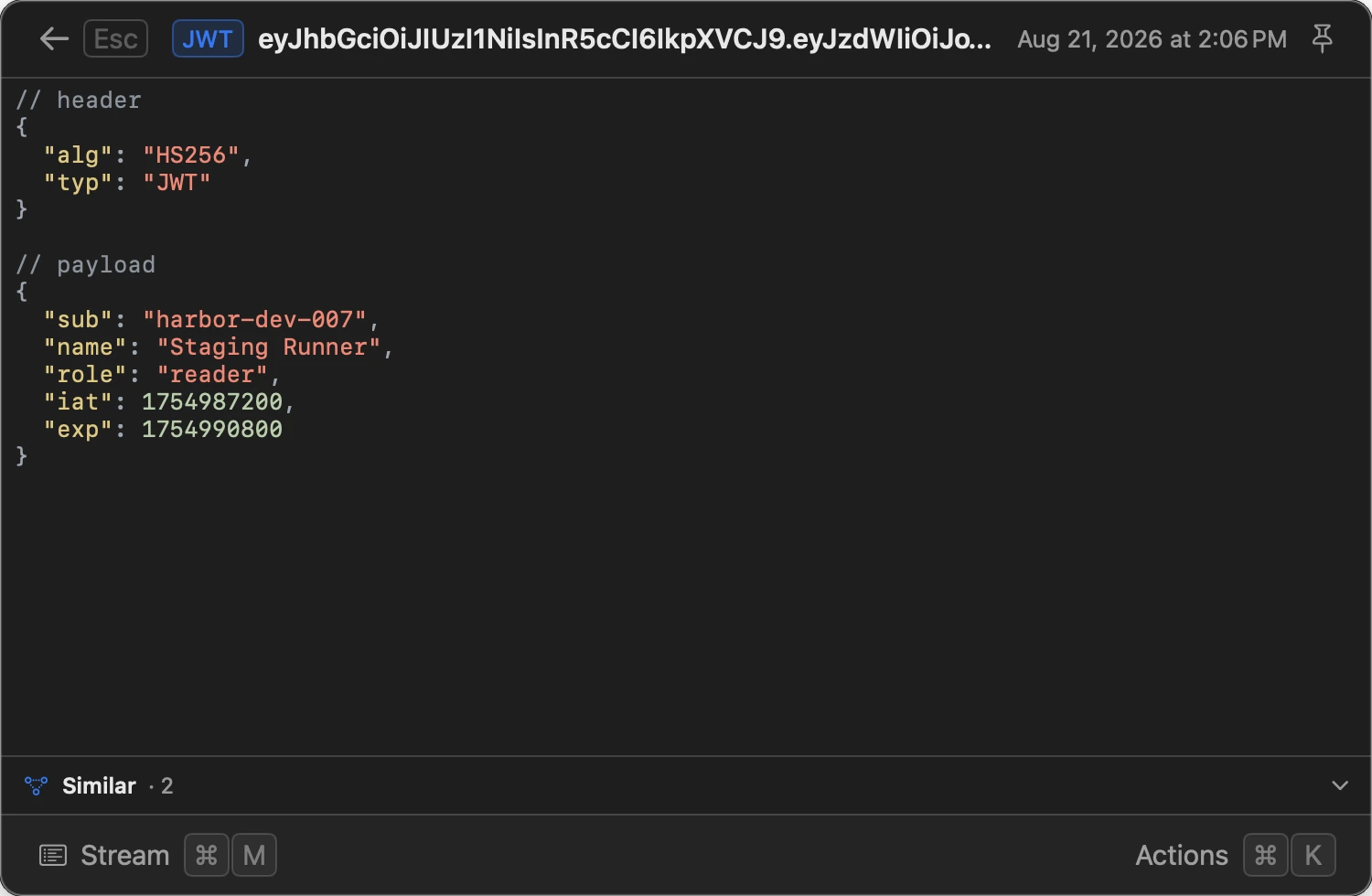
eyJhbGciOiJIUzI1NiIsInR5cCI6IkpXVCJ9.eyJzdWIiOiJ1c2VyXzg4NDIiLCJuYW1lIjoiVmlrdG9yIiwic2NvcGUiOiJub3Rlcy5yZWFkIiwiZXhwIjoxNzg2ODAwMDAwfQ.3sQ0m0Rl1x5v2Nn8H2yTQmYh0d2m8s1c9a3b7f4e6d5
Header
"alg": "HS256", "typ": "JWT"
Payload
"sub": "user_8842"
"name": "Viktor"
"scope": "notes.read"
"exp": 1786800000
What gets recognized
| Chip | What it is | What you see |
|---|---|---|
| JWT | A token: three dot-separated parts | Header and payload as formatted JSON |
| Base64 | An encoded blob | The decoded text |
| Image | Base64 or a data: URI that turns out to be a picture |
The picture itself |
| JSON | A minified or flattened document | Re-indented, with the keys in their original order |
| XML / HTML | Markup on one line, or a fragment copied from a page | Laid out across indented lines |
| CSV / TSV | Delimited data – what Numbers, Excel and Google Sheets put on the clipboard | A real table |
| URL | Percent-encoding (%D0%BF%D1%80…) |
The decoded text |
| Escaped | \n, \uXXXX, or HTML entities (&, п) |
The unescaped text |
| Color / Colors | One color or a palette: #3A7BD5, #abc, rgb(58, 123, 213), hsl(214, 65%, 53%), with or without alpha |
Every color drawn, with the notations it wasn’t written in |
Two layers are unwrapped: a JWT whose payload is JSON comes out as formatted JSON, and a base64 blob that decodes to a JSON document comes out laid out. Deeper than that and the result stops being something you can relate to the record in front of you, so a third layer is left alone. The chip keeps the name of the outer format – that’s the answer to “what is this thing”.
Copying
With the chip pressed, ⌘ C copies what you see:
- formatted text – the decoded or re-indented version;
- a table – as a Markdown pipe table, ready to paste into a document, an Obsidian vault or a GitHub issue;
- a picture – as an image, so it pastes into anything that takes one;
- colors – the hex values, one per line. Clicking a single notation in the
view copies just that one, which is the point of showing all three: you
copied
#3A7BD5and the file you’re pasting into wantsrgb(58, 123, 213).
Select part of the text first and ⌘ C copies just the selection, as it always does. With no chip pressed and nothing selected it hands over the whole record – keeping the formatting a clip arrived with, the same as copying it from the list, and ⌥ ⌘ C hands over the text alone. (A decoded view is plain text either way, so with a chip pressed the two do the same thing.)
Tables
The first row becomes the header. That’s a fixed rule rather than a guess: deciding it from the data is right most of the time, and the rest of the time it looks like a row of data went missing – and the raw text is one keypress away regardless.
Large exports are shown up to the first 1000 rows, with a note under the table. Copying is never capped – it always takes every row, however many are on screen.
When you don’t get a chip
Recognition is deliberately hard to please, because a chip that lies is worse than no chip at all. Some cases that look close but are left alone on purpose:
- A color inside something else.
background: #3A7BD5;is a CSS rule, and a sentence naming a brand color is a sentence. The whole record has to be colors and separators before it’s called a palette. #1234on its own. Every decimal digit is also a hex digit, so a lone#number with no letters in it is an issue or order reference as readily as a color – and far more often one. That covers the three-, four- and eight-digit forms;#123456still gets a chip, since six digits is the way a color is written. A letter (#3a3) or a second value (#1234 #5678) settles it either way.- Prose with commas. “Hello, world” over three lines has the shape of a table, but the space after the delimiter is something a person writes and a program doesn’t.
- “100% done”. A stray
%is not percent-encoding. C:\new folder.\nand\tare also what a Windows path is made of, so escaping needs a\", a\\or a\uXXXXbefore it’s believed.- Base64 of an archive. Bytes that are neither readable text nor a picture have nothing to show.
- JSON that’s already indented. It’s laid out already; reformatting it would only impose a different width on someone else’s file.
Syntax colors
Whatever the chip shows – a JSON document, XML or HTML, the two halves of a decoded token – is colored by syntax rather than laid out as a wall of grey. Colors follow the system theme and are only ever added: the record itself is untouched, key order is preserved, and ⌘ C hands over exactly what it did before.
The colors follow what is on screen, not what the chip is named after. A base64 blob carrying JSON says “Base64” on the chip – that is what the record is – and reads as JSON underneath, which is what you are actually looking at.
The languages that have a grammar are listed under Code blocks – the same set colors a fenced block, a document under a chip and a note that is code.
Records past syntaxHighlight.maxBytes (256 KB) are shown in the same layout
without color. The indentation, which is what makes a document readable, has
already been done.
Notes that are code
A note or a clip that is a source file from top to bottom opens with syntax colors and a chip naming the language – “Swift”, “Python”, “Diff”. Press it to go back to the ordinary view.
The chip starts pressed here, unlike the format chips above, because Markdown drawn over a source file looks obviously wrong and nobody needs to be asked first. It exists for the other direction: a language guessed wrong just looks like poor highlighting, and this is what you do about it.
Recognition is deliberately reluctant, because prose shown as code looks like the app is broken:
- Anything shorter than five lines is a command or a sentence, not a file.
- Anything with Markdown structure in it – a fence, or a heading together with a list or a link – is a document. A README full of code is still a README.
- Prose, lists, logs and verse are refused on shape before any guessing starts: code indents and terminates its lines, and paragraphs don’t.
- The language has to win clearly, not merely come first. Every candidate gets a score whatever you feed the detector, so a lead over the runner-up is what counts – and that lead is measured as a share of the winner’s own score. The score counts matched keywords, so it grows with the text: on a whole source file the languages finish hundreds of points up and a few points apart, which is a coin toss rather than an answer.
- A clip that came from Xcode, VS Code, a JetBrains IDE or a terminal is known to be code by where it came from – which settles whether, not which.
- SQL is never guessed at all: its keywords –
select,from,where,order,by,with,case,end– are ordinary English words, and a page of meeting notes scored as SQL the moment it was allowed to compete. A fence that says ```sql is still colored, because that is the author saying so rather than us guessing. - TypeScript isn’t guessed either, for the opposite reason: its grammar is
JavaScript’s with more in it, so the two always finish a point or two apart
and neither ever wins clearly. A
.tsfile opens as JavaScript, which colors everything except the types; a ```ts fence still gets the real thing. - Only a handful of languages are guessed by default – far fewer than the app
can color. That is not only a budget: scores aren’t comparable between
grammars, and with every language competing the C-family ones land within a
point of the right answer and nothing wins clearly. The rest join in when the
text carries their own mark – a
$variablefor PHP, a shebang for shell, a#include <…>for C++ – which puts them in the running without deciding anything. They still have to win by the same margin.
If it still guesses wrong for the way you write, detectCodeNotes: false in
advanced.yaml turns this one part off and leaves
everything else working.
Editing
The chip turns off when you enter edit mode (⌘ E), and edits always apply to the raw text. Saving the formatted version back into the record would silently rewrite what was captured.
Limits
In advanced.yaml, under contentViews:
detectMaxBytes(5 MB) – records larger than this get no chip. Detection runs when a record opens, and past some size the honest answer is no chip rather than a slow open.tableMaxRows(1000) – rows of a table shown at once. Copying ignores it.
And under syntaxHighlight:
maxBytes(256 KB) – longest text that gets colored. Much smaller than the chip’s own ceiling, because coloring runs a grammar over every character while detection is a handful of scans.detectCodeNotes(true) – whether a note that is code opens highlighted.codeNoteRelevanceGapShare(0.15) – how far ahead of the runner-up the winning language has to finish, as a share of its own score. Raise it for fewer guesses, lower it for more.
Related
- Markdown – tables here use the same renderer, and the list of colored languages lives there
- Clipboard
- Screenshot viewer
- Hotkeys